Live Chat
Live Chat lets an AI Agent hand a conversation over to a human helpdesk agent and take it back when the live session ends. Use Live Chat when a client asks for a person, or when the AI Agent can't resolve the request.
The AI Agent keeps handling routine questions on its own. It routes only the conversations that need a person to your helpdesk agents.
Live Chat terms
The Live Chat topics use the following terms.
| Term | Meaning |
|---|---|
| Client | The end user who chats with the AI Agent and asks to talk to a person. |
| Helpdesk agent | A Druid Portal user with the Helpdesk Agent security role who handles live chat sessions. Also called agent or live agent. |
| Live Chat agent | A helpdesk agent registered under Live Chat Agents in a solution, so that you can assign the agent to queues and set a working schedule. |
| Queue | A named waiting list for clients, for example one per department. If you don't define queues, all agents belong to one global queue. |
| Waiting queue | The list of clients waiting for a helpdesk agent to pick them up. |
| Multichat | The helpdesk agent's page. Agents see live and waiting conversations and chat with several clients at the same time. |
| AI Agent Assistant | The chat between the helpdesk agent and the AI Agent inside Multichat. Agents use it to transfer chats or run actions. |
| Special flow | A flow that Druid triggers automatically on a Live Chat event, for example when an agent disconnects. You select special flows in the AI Agent Live Chat settings. |
| Special message | A predefined message that Druid sends on a Live Chat event, for example ConnectedToHelpdeskAgent. |
How Live Chat works
A live chat session moves through three stages. The AI Agent stays in the conversation during all of them.
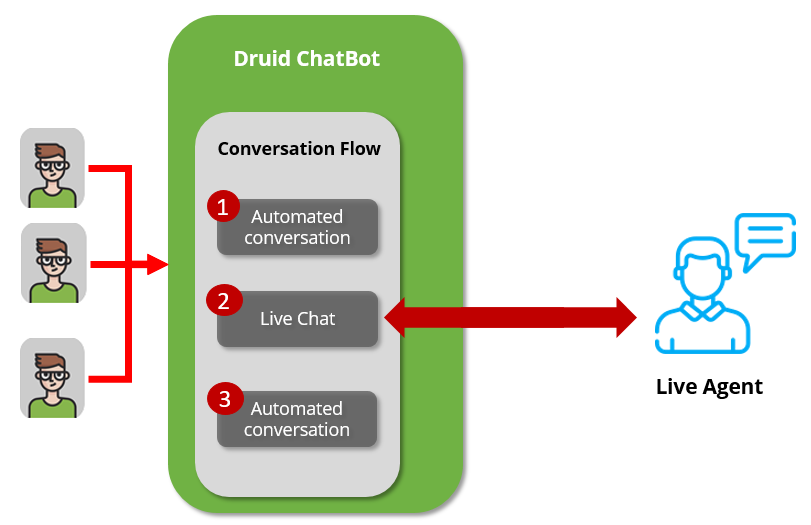
- Automated conversation. The client chats with the AI Agent.
- Live chat. The client asks to talk to a person. The AI Agent places the client in the waiting queue. A helpdesk agent picks up the client from the queue, and the live conversation starts.
- Automated conversation. The client or the agent ends the live chat, or the live chat times out. The client continues with the AI Agent.
Live Chat lifecycle
The Live Chat lifecycle shows what the client, the AI Agent, and the helpdesk agent do at each stage. It also shows which special flows and special messages Druid triggers along the way. You can customize each of these events.
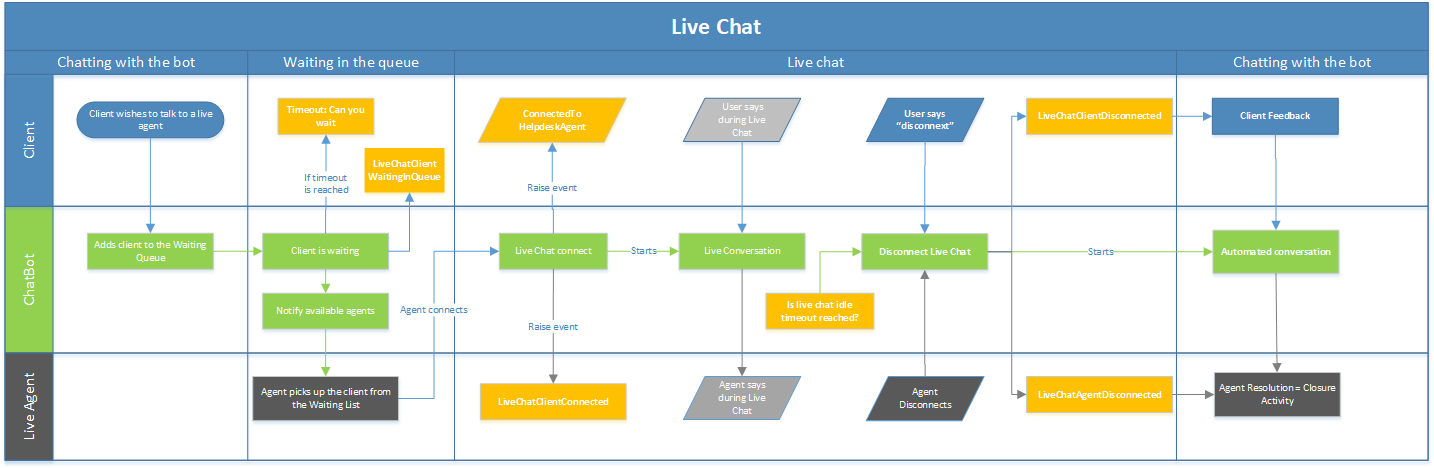
The lifecycle has four stages:
- Chatting with the AI Agent. The client asks to talk to a live agent. The AI Agent adds the client to the waiting queue.
- Waiting in the queue. While the client waits, the AI Agent notifies the available helpdesk agents. If the queue waiting timeout is reached, the AI Agent asks the client whether they want to keep waiting. A helpdesk agent picks up the client from the waiting queue.
- Live chat. The AI Agent connects the agent and the client. It sends the
ConnectedToHelpdeskAgentspecial message to the client and runs the Live chat client connected flow on the agent side. The client and the agent exchange messages. The live chat ends when the client says "disconnect", when the agent disconnects, or when the idle timeout is reached. - Back with the AI Agent. Druid runs the Live chat client disconnected flow, which collects the client's feedback. It also runs the Live chat agent disconnected flow, in which the agent sets the resolution of the chat. The client continues the automated conversation.
The diagram uses these conventions:
| Shape or color | Meaning |
|---|---|
| Rectangle | An action |
| Parallelogram | A message |
| Light green | An action performed by the AI Agent |
| Light gray-blue | A special flow or a special message |
| Light orange | An event triggered by a timeout |
| White | Client input |
| Beige | An action performed by the helpdesk agent |
| Dashed outline | Messages exchanged during the live chat |
Live Chat capabilities
Druid Live Chat provides:
- Routing to a helpdesk agent on request, or when the AI Agent can't resolve the request.
- Multiple queues, transfers between queues and agents, and priority levels.
- Automatic allocation of waiting clients to available agents.
- Multichat, where one agent handles several conversations in parallel.
- Sound notifications when a client joins the waiting queue.
- Working schedules and automatic sign-out for agents.
- Real-time machine translation between client and agent languages.
- Agent Assist, which suggests replies to the agent.
- A Live Dashboard for helpdesk managers.
Live Chat topics
Each Live Chat topic covers one part of the setup.
| Topic | Use it to |
|---|---|
| Set up Live Chat | Import the Live Chat Advanced solution and configure the AI Agent Live Chat settings. |
| Live Chat Advanced flows | Change what the AI Agent does on the client side and the agent side. |
| Queues, agents, and automatic allocation | Add agents, create queues, route and transfer clients, and allocate clients automatically. |
| Working hours and automatic sign-out | Set schedules for queues and agents. |
| Multichat for helpdesk agents | Learn what helpdesk agents can do in Multichat. |
| Block chat users | Stop abusive users from joining the waiting queue. |
| Agent Assist | Suggest replies to helpdesk agents. |
| Live Dashboard and helpdesk KPIs | Monitor queues and agents in real time, and report on helpdesk KPIs. |
To connect Live Chat to a third-party contact center instead of the Druid agent page, see Contact Centers.